SettingsNotifications
Notifications
Reference for Settings > Notifications: every rule and when it fires, the defaults per use case, destinations and plan limits, and your own email preferences.
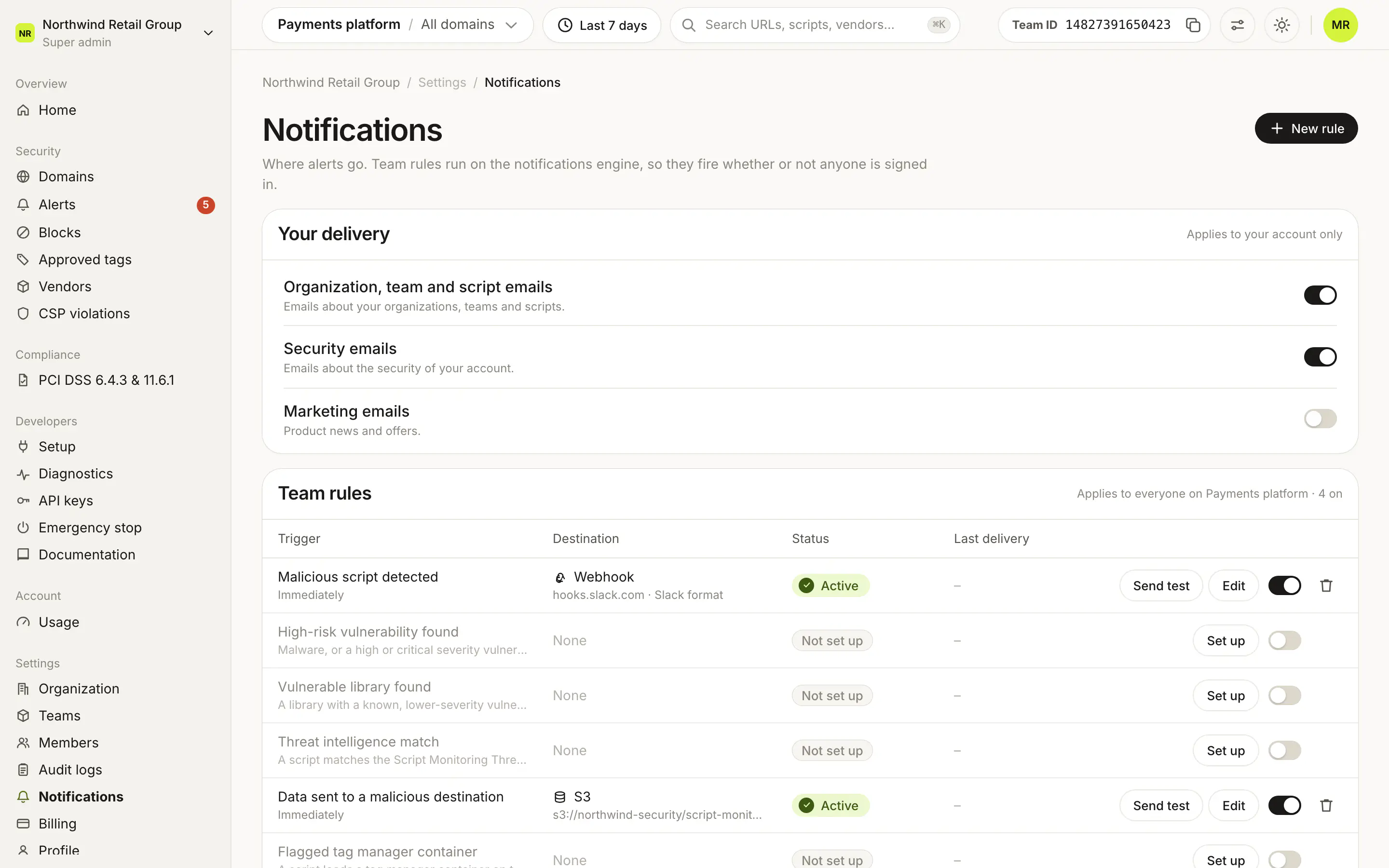
Settings > Notifications decides which Script Monitoring events reach your team and where. There is one team rule per trigger, and each rule sends to email, a webhook or an S3 bucket. Rules run on the notifications engine, so they fire whether or not anyone is signed in. To set up a rule and test it, follow the guide →.
Which events can notify me?#
The Team rules card lists every trigger, with its status (Active, Paused, Locked, Not set up or Removed integration) and last delivery.
| Rule | When it fires | Cadence |
|---|---|---|
| Malicious script detected | The rules engine flags a malicious or suspicious script. | Immediately |
| High-risk vulnerability found | Malware, or a high or critical severity vulnerability, in a script. | Immediately |
| Vulnerable library found | A library with a known, lower-severity vulnerability. | Immediately, daily or weekly |
| Threat intelligence match | A script matches the Script Monitoring Threat Intelligence list. | Immediately |
| Data sent to a malicious destination | A page sends data to a destination on the threat list. | Immediately |
| Flagged tag manager container | A script loads a tag manager container on the threat list. | Immediately |
| New outbound connections to review | Outbound hostnames still waiting for review. | Daily or weekly |
| CSP violations digest | Scripts your Content-Security-Policy blocked. | Daily or weekly |
| Recommended CSP header changed | The recommended Content-Security-Policy for a domain changed. | Daily or weekly |
| Security headers changed | Security headers changed on a payment page. | Immediately |
| PCI evidence pack ready | A PCI DSS evidence pack is ready to download. | Daily or weekly |
| PCI vendors need review | Payment-page vendors still need a PCI DSS review. | Weekly |
Recommended CSP header changed needs the CSP Builder, which is not on for every team.
Which rules are on by default?#
The use case you pick in Setup step 1 sets the defaults:
| Use case | Rules turned on |
|---|---|
| Client-side security | Every rule except PCI evidence pack ready and PCI vendors need review. |
| PCI DSS 6.4.3 & 11.6.1 | Security headers changed and PCI evidence pack ready. |
| Both | Every rule. |
Changing the use case later updates only the rules nobody has edited. Turning a rule on from its switch emails all team members; edit it to change that.
What does each destination need?#
| Destination | Fields | Plan |
|---|---|---|
| Send to all team members, or chosen Team members, plus Other addresses for people outside the team, such as a shared security inbox. | All plans | |
| Webhook | URL, Signing secret and Format: JSON, Slack or Discord. | Pro and Enterprise |
| S3 | Bucket, Region and an optional Path prefix. | Pro and Enterprise |
Some triggers limit the destinations: PCI vendors need review sends email only, and Recommended CSP header changed sends email or webhook.
Webhooks#
Script Monitoring posts each alert to your URL, signed with your Signing secret. How to verify the signature, and what the payload looks like: Webhooks.
S3#
Script Monitoring writes alerts to your bucket as hourly CSV files named alerts-team-<teamID>-<from>-<to>.csv, under the path prefix. Your bucket policy must let Script Monitoring write to it.
What about my own email preferences?#
Your delivery applies to your account only: Organization, team and script emails, Security emails and Marketing emails.
Frequently asked questions#
Do rules need someone signed in?
No. Team rules run on the notifications engine, so they fire whether or not anyone is signed in.
Why can't I pick S3 or a webhook for some rules?
Some triggers limit their destinations: PCI vendors need review sends email only, and Recommended CSP header changed sends email or webhook. Webhook and S3 also need Pro or Enterprise.