SettingsOrganization
Reference for Settings > Organization: the name, ID, primary contact and data retention, plus single sign-on, required MFA and the audit log.
Settings > Organization holds the settings that apply to every team in your organization: its name and ID, the primary contact, data retention, single sign-on, required MFA and the audit log. Super admins can change them. MFA enforcement is on every plan, while single sign-on and audit logs are on Enterprise.
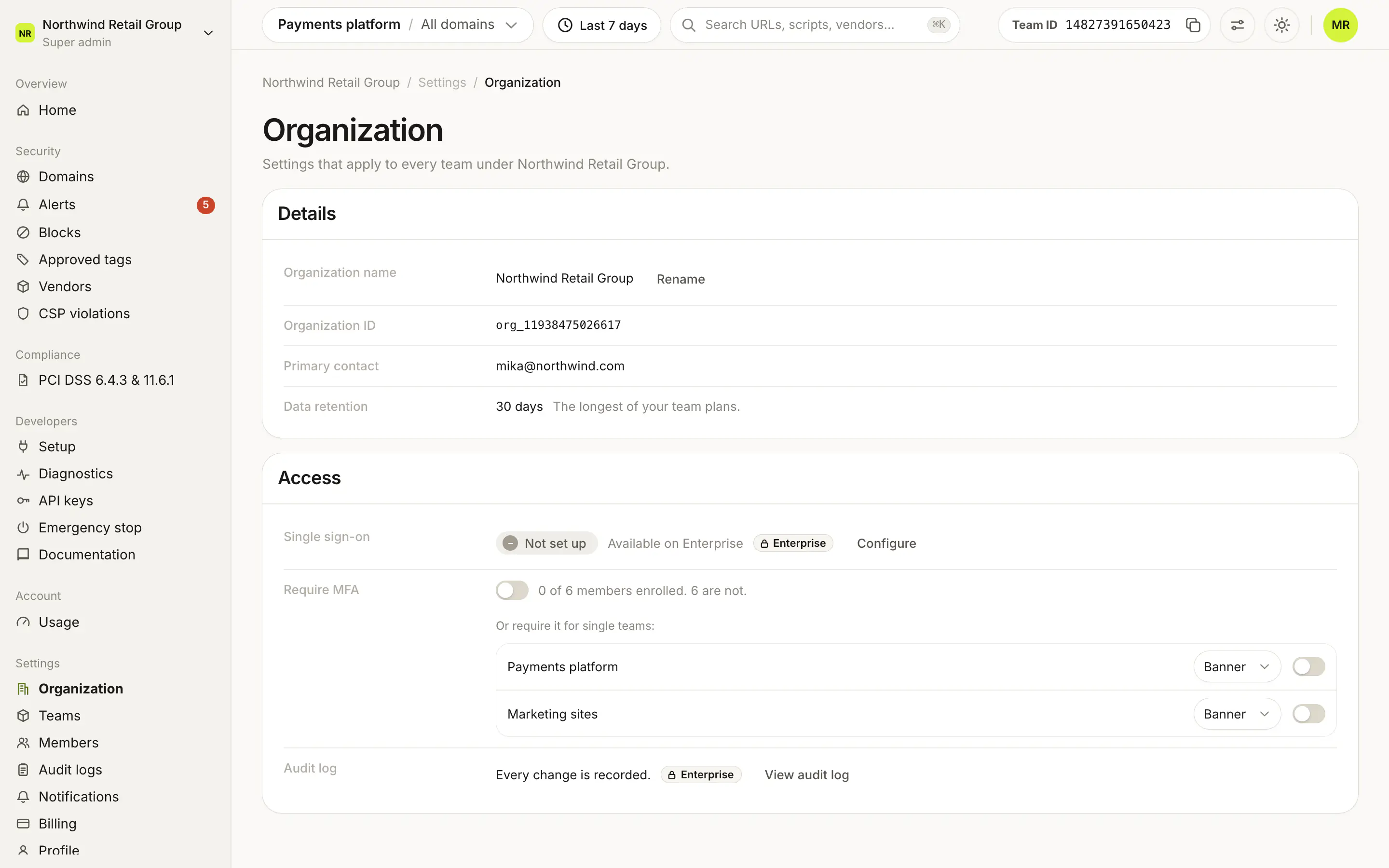
What does the Details card show?#
| Row | What it shows |
|---|---|
| Organization name | The organization's name. Rename changes it, and the new name also appears on future invoices. |
| Organization ID | The organization's ID. |
| Primary contact | The email address of the organization's owner. |
| Data retention | How many days of history the organization keeps: the longest of its teams' plans (30 days on Free and Pro, 90 on Enterprise). With more than one team, it adds The longest of your team plans. |
What does the Access card show?#
Single sign-on#
The status is Enabled with the provider (SAML 2.0, or an OIDC provider such as Okta, Microsoft Entra ID, Google Workspace or Duo), or Not set up. Configure opens the single sign-on settings. SSO is on Enterprise: without it, the row shows Available on Enterprise with a lock, and Configure opens the plan sheet.
Require MFA#
The switch requires multi-factor authentication for every member of the organization. Next to it: how many members are enrolled and how many are not, and how many grace days are left once enforcement is on.
Turning it on asks for an Enforcement mode:
| Mode | What members without MFA see |
|---|---|
| Banner | A banner until they set it up. |
| Lockout | They are locked out of the dashboard until they set it up. |
Members get a 14-day grace period to set up MFA. People who join later get their own 14 days.
Under the switch, Or require it for single teams lists each team with its own mode picker (Banner or Lockout) and switch. To change a team's mode, turn its enforcement off and on again, which restarts the grace period. When the organization rule is on, the list says Every team is covered by the organization rule.
Audit log#
Every change is recorded. View audit log opens the audit logs. Audit logs are on Enterprise, so the row shows an Enterprise lock on other plans.
Who can use Organization?#
Super admins see Organization in the sidebar and can rename the organization, configure single sign-on and require MFA. Other members who open the page see it read-only, without the per-team MFA list, and the Require MFA switch shows Only Super admins can change this.
Frequently asked questions#
Why does Data retention show 90 days when one team is on Pro?
The organization keeps the longest retention of its team plans. With more than one team, the row says The longest of your team plans.
Can I require MFA on the Free plan?
Yes. MFA enforcement is on every plan. SSO and audit logs are Enterprise.
What is the difference between Banner and Lockout?
With Banner, members without MFA see a banner until they set it up. With Lockout, they are locked out of the dashboard until they set it up. Either way they get a 14-day grace period first.
Who can change these settings?
Super admins. Other members can open the page, but the controls are read-only for them.