SecurityVendors
Reference for Security > Vendors: vendor statuses, what the details sheet shows, what Allow and Block do, the pinned rows and the Pro features.
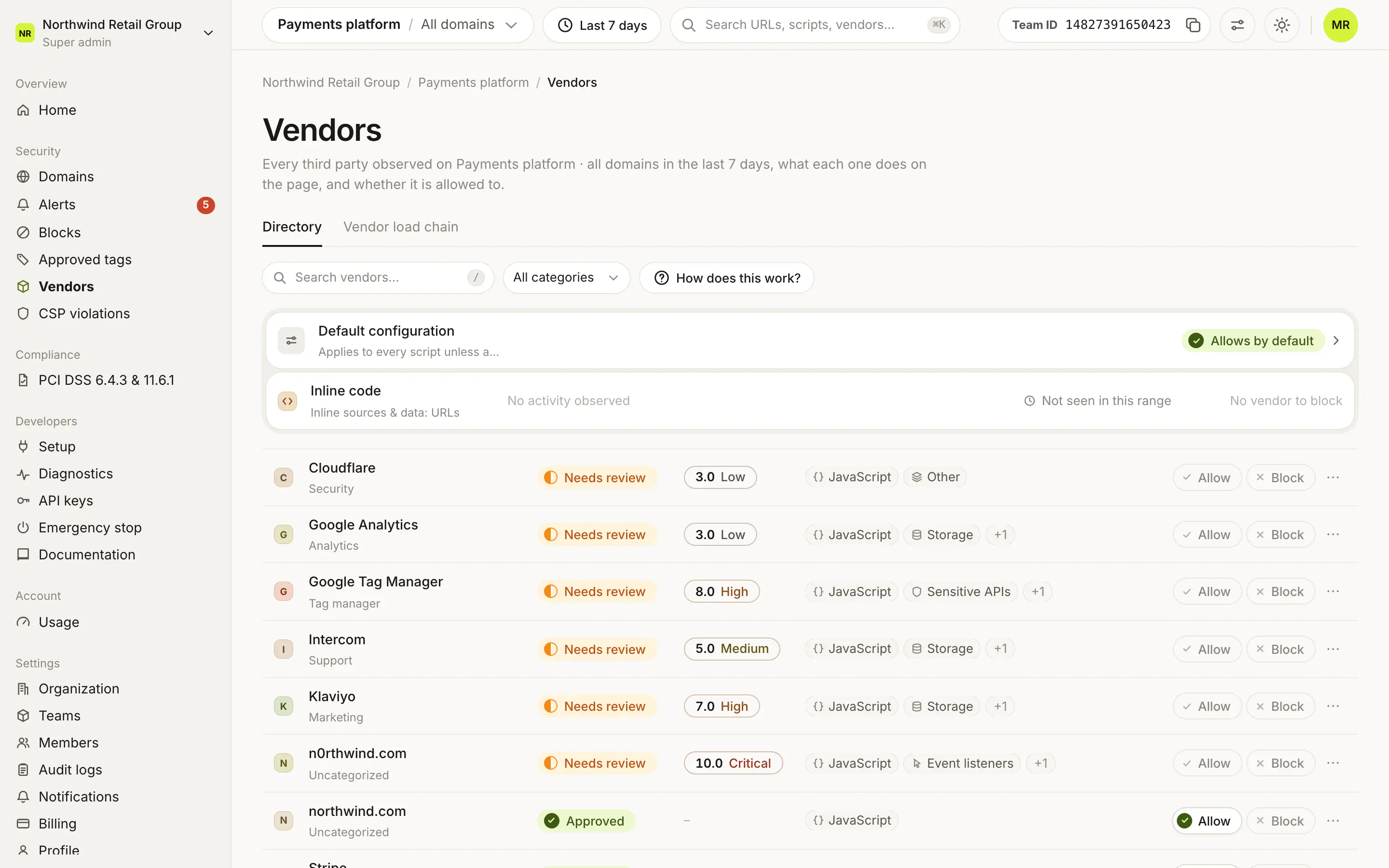
Security > Vendors lists every third party observed on your pages in the top bar's date range, one row per vendor, with one decision each: Allow approves it and records what it is allowed to do, Block stops every resource it serves on all of the team's domains. Alerts and the PCI DSS evidence use the same decision. To review vendors step by step, follow the guide →.
What do the statuses mean?#
| Status | Meaning |
|---|---|
| Approved | Someone allowed the vendor and it has no open alerts. |
| Needs review | Nobody has decided yet, or it raised an alert since. |
| Blocked | Every resource it serves is stopped on all of the team's domains. |
What does a vendor's details sheet show?#
- Why it scored: the rule behind its risk score, or "Not scored" if none of its scripts raised an alert.
- Load chain: whether your page loads it directly or another vendor does (Pro and Enterprise).
- PCI DSS 4.0.1: whether it runs on a payment page, and whether it has a recorded justification.
- Seen pages: the pages it runs on, each marked Payment page or Not a payment page.
- What it does on the page and Permissions (per-vendor permissions are Pro and Enterprise).
- The Sub-scripts and Alert rules tabs.
What does Allow do?#
Allow approves the vendor: it lifts the vendor's block, if it had one, and records an explicit allow for everything the vendor was seen doing. The vendor turns Approved once it has no open alerts. Allowing from Security > Alerts also resolves the vendor's open alerts.
What does Block do?#
Block stops every resource the vendor serves (not only scripts, but images, fonts, frames, stylesheets and any other request) on every domain in the team, after you give a reason. How this compares with blocking from an alert: Should I block from Alerts, Vendors or Blocks?.
What are the two pinned rows?#
- Default configuration applies to every script unless a vendor's configuration overrides it. Its badge says Allows by default, Blocks by default or Custom default.
- Inline code covers inline sources and
data:URLs. It has no vendor to block.
What else is in a row's menu?#
Open vendor details, and Reset reviewed permissions, which sends the vendor back to needing review.
Frequently asked questions#
What does "Needs review" mean?
Nobody has decided on the vendor yet, or it raised an alert since it was approved. Alerts and Vendors share this status.
Why can't I see the load chain or per-vendor permissions?
The vendor load chain and per-vendor permissions are included in Pro and Enterprise. Allowing and blocking a vendor work on every plan.
Can I undo an Allow or a Block?
Yes. Allow shows an Undo in its toast, and allowing a blocked vendor lifts its block.