SettingsTeams
Reference for Settings > Teams: every team in the organization with your role, its domains and open alerts, how to switch teams, and who can add one.
Settings > Teams lists the teams in your organization, with your role in each, its domains and its open alerts. A team owns its own domains, members and billing line, and switching team changes which domains you see everywhere else. Every plan includes one team. Multiple teams are on Pro and Enterprise.
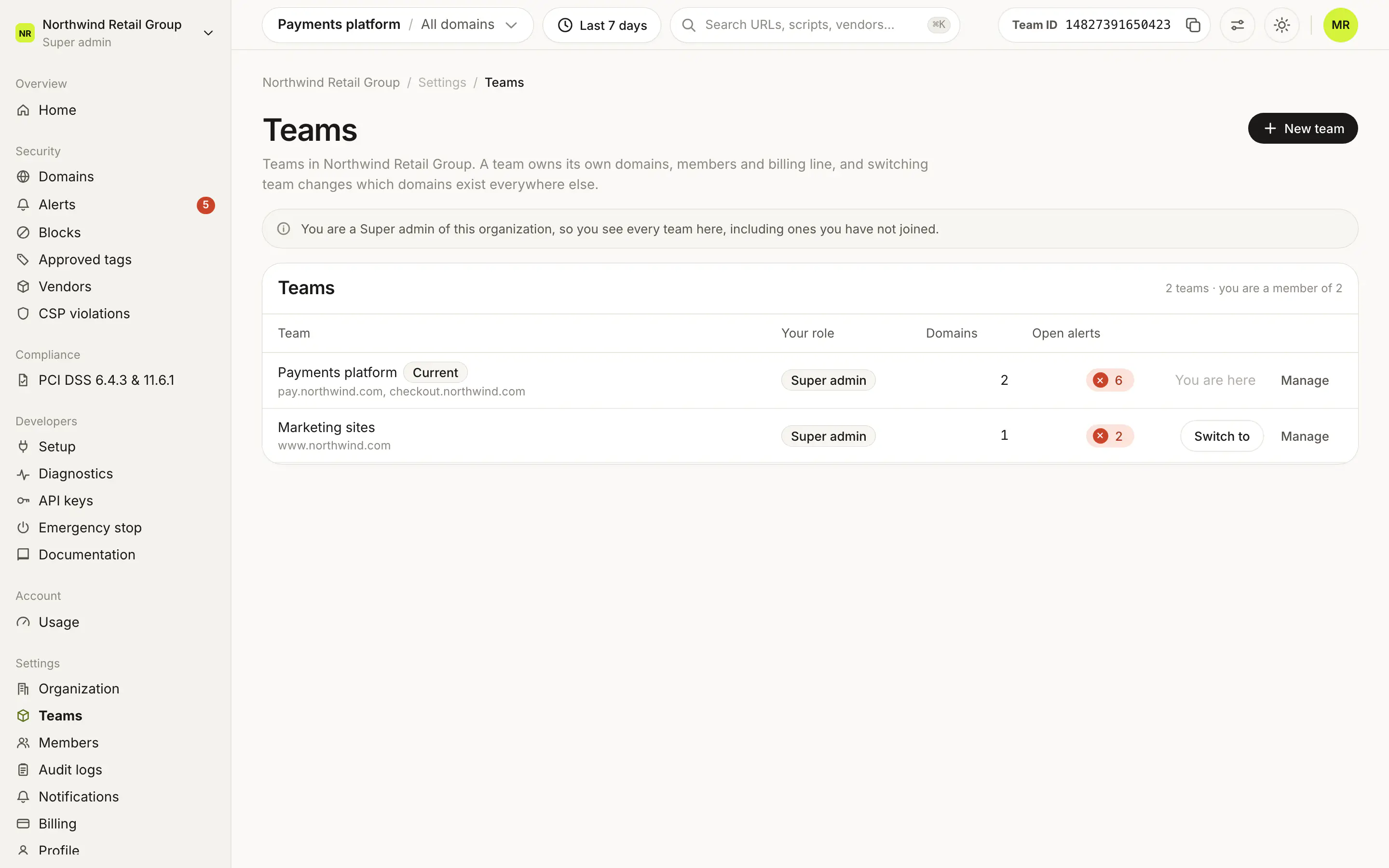
What does the table show?#
The header shows how many teams there are and how many you are a member of. A note above it says which teams you see: every team, if you are a Super admin or can manage billing, or only the teams you belong to.
| Column | What it shows |
|---|---|
| Team | The team name, with a Current badge on the team in the top bar, and its domains underneath (or No domains yet). |
| Your role | Super admin, Admin or Viewer, or Not a member for a team you can see but have not joined. |
| Domains | How many domains the team has. |
| Open alerts | The team's open alerts. |
With no team to show, the page says No teams visible and asks you to have a Super admin add you to a team.
What are the row actions?#
- Switch to opens the team's Home. On the current team, the row says You are here.
- Open or Open as Super admin appears instead of Switch to on a team you can see but have not joined.
- Manage renames the team.
How do I add a team?#
New team opens Create a team: a Team name and a Plan (Free, Pro or Enterprise). Free is always available. Pro and Enterprise are available when your organization has plans allocated to it, with how many are used. Create team creates it.
On Free, New team shows a Pro lock and opens the plan sheet with "Multiple teams are on Pro and Enterprise." What each plan includes is on Plans.
Who can use Teams?#
Every member can open Settings > Teams. Super admins can add teams with New team and rename them with Manage.
Frequently asked questions#
What does a team own?
Its own domains, members and billing line. Switching team in the top bar changes which domains you see everywhere else in the dashboard.
Why is New team locked?
Multiple teams are on Pro and Enterprise. On Free, New team shows a Pro lock and opens the plan sheet. A team on Pro or Enterprise unlocks it for the whole organization.
Why do I see teams I have not joined?
Super admins and Admins with Can manage billing see every team in the organization. Admins and Viewers see only the teams they belong to.
Can I create teams with the API?
Yes, on Pro and Enterprise, with an organization API key (sm_org_…). See Create a team.