SettingsBilling
Reference for Settings > Billing: the team's plan card and its statuses, the organization's payment method, invoices, and who can change each.
Settings > Billing shows the plan of the team in the top bar, the organization's payment method and the organization's invoices. Each team has its own plan, while the card and the invoices are shared by the whole organization. Change the plan from the plan card, add a card from Payment method, and download any invoice from Invoices.
What does the plan card show?#
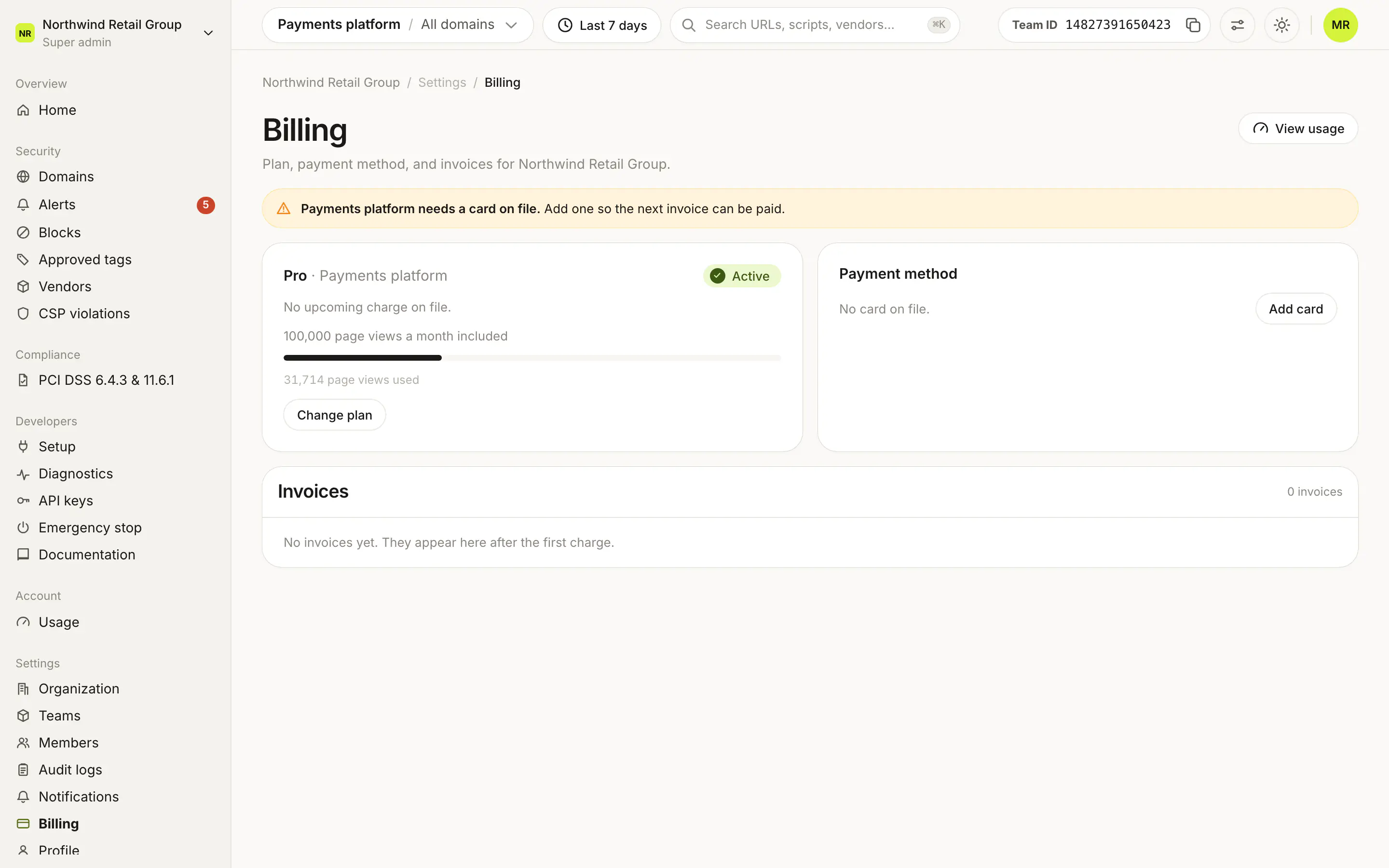
The card's title is the plan (Free, Pro or Enterprise) and the team name. Below it:
- Price: the next charge and per month, billed monthly or per year, billed yearly. Free shows $0 free forever. A paid plan with nothing due shows No upcoming charge on file. Enterprise shows Billed by invoice and Contact your account manager to make changes. A credit on the account shows as credit on the account.
- Included page views: such as "100,000 page views a month included", or Unlimited page views.
- Usage bar: page views used this period against the included amount. It turns red past the plan. The full breakdown is on Usage, through View usage at the top of the page.
- Dates: Renews, Trial ends or Ends, with the date.
What do the statuses mean?#
| Status | Meaning |
|---|---|
| Active | The plan is running normally. |
| Trial | The team is in its 14-day Pro trial. Trial ends shows the date. |
| Cancelling | The plan is set to end. Ends shows the date. |
| Payment overdue | An invoice needs payment. Pay invoice opens it. |
What are the buttons?#
- Upgrade (Free) opens the plan sheet on Pro and Enterprise.
- Change plan (Pro) opens Manage your subscription, where you change the page view volume, the billing period, or move to another plan.
- Pay invoice appears when a payment is overdue.
Enterprise plans have no plan button. How the plan sheet works is on Plans.
What does Payment method show?#
The organization's default card: its last four digits, brand, expiry date and a Default badge. Under it, Billing address lists the card's Address, City and Country. With no card, the card says No card on file.
- Add card adds a card to the organization.
- Switch appears when the organization has more than one card, and changes the default.
When a team needs a card, a note at the top of the page says so: "Team needs a card on file." During a trial it asks you to add one before the trial ends to keep the plan.
What does the Invoices list show?#
The organization's invoices, newest first. The header shows how many there are. Before the first charge, the list says No invoices yet. They appear here after the first charge.
| Column | What it shows |
|---|---|
| Date | When the invoice was created. |
| Team | The team the invoice is for. |
| Amount | The invoice total. |
| Status | Paid, Open, Draft, Void or Uncollectible. |
| Invoice | Downloads the invoice. |
Who can use Billing?#
| Action | Who |
|---|---|
| Open Billing | Super admins, Admins with Can manage billing, and Admins of the team in the top bar |
| Change the team's plan | Super admins, Admins with Can manage billing, and Admins of that team |
| Add or switch the card | Super admins and Admins with Can manage billing |
Viewers don't see Billing in the sidebar. Usage warnings on this page show only to people who can change the plan.
Frequently asked questions#
Is billing per team or per organization?
Both. Each team has its own plan, shown on the plan card for the team in the top bar. The payment method and invoices belong to the organization, and each invoice names its team.
Who can change a team's plan?
Super admins, Admins with Can manage billing, and Admins of that team.
Who can add or switch the card?
Super admins and Admins with Can manage billing.
Why does my Enterprise plan say "Billed by invoice"?
Enterprise is set up with our team, so there is no self-serve plan change. To change limits or terms, contact your account manager or talk to an expert.