Get startedVite
Install with the Vite plugin
Install @scriptmonitoring/vite and register scriptMonitoring() in vite.config.ts. Every production build gets the tag first in the head.
On a Vite project you install Script Monitoring as a build plugin: add @scriptmonitoring/vite and register scriptMonitoring() in vite.config.ts. Every production build then carries the tag at the very start of the <head>, so the install is enforced by your build rather than remembered by whoever edits index.html.
How do I install the plugin?#
-
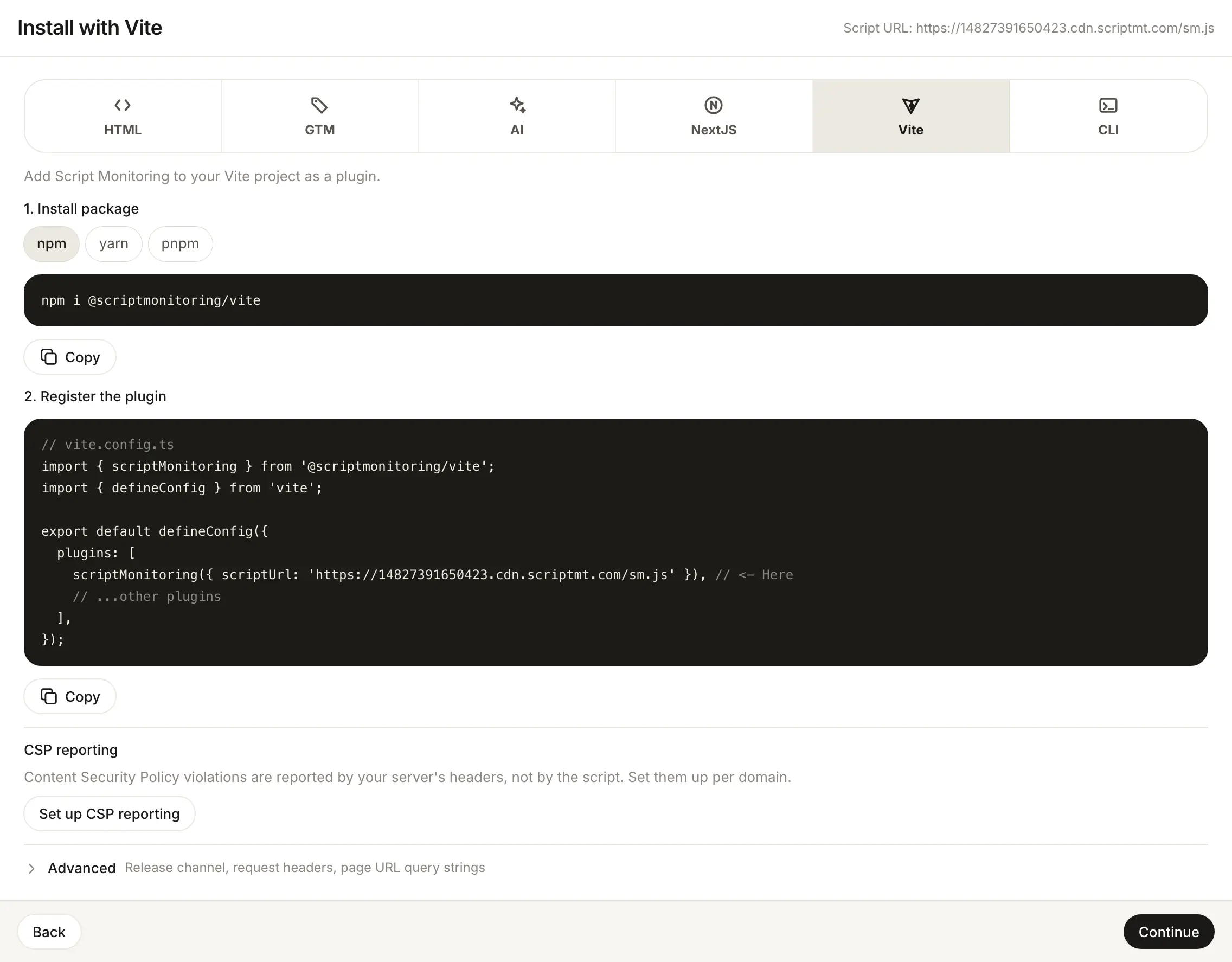
In the dashboard, open Developers > Setup, go to step 3, Install, and pick Vite.
-
Install the package (1. Install package):
npm i @scriptmonitoring/viteWith yarn,
yarn add @scriptmonitoring/vite. With pnpm,pnpm i @scriptmonitoring/vite. -
Register the plugin (2. Register the plugin). This is the dashboard's snippet with your script URL filled in:
// vite.config.ts import { scriptMonitoring } from '@scriptmonitoring/vite'; import { defineConfig } from 'vite'; export default defineConfig({ plugins: [ scriptMonitoring({ scriptUrl: 'https://<teamID>.cdn.scriptmt.com/sm.js' }), // <- Here // ...other plugins ], }); -
Build and deploy, then check Verify it's working.
Which options does scriptMonitoring() take?#
| Option | What it does |
|---|---|
teamId | Your team ID. Loads https://<teamID>.cdn.scriptmt.com/sm.js. The recommended option. |
scriptUrl | Your full script URL, as in the dashboard snippet. Deprecated: it still works, with a build warning. |
enabled | Turns the plugin on or off. Defaults to off in the dev server and on in builds. |
The same configuration with teamId:
// vite.config.ts
import { scriptMonitoring } from '@scriptmonitoring/vite';
import { defineConfig } from 'vite';

export default defineConfig({
  plugins: [scriptMonitoring({ teamId: '<teamID>' })],
});
Why don't I see the tag in development?#
The plugin skips the dev server unless you pass enabled: true, and logs "[Script Monitoring] Plugin is disabled (because you are in development mode)". Check the built dist/index.html instead: the first element in <head> is the Script Monitoring tag.
Frequently asked questions#
Why is the tag missing when I run the dev server?
The plugin is off in the Vite dev server by default and logs a warning saying so. It runs in production builds. Pass enabled: true to turn it on in development too.
Should I use scriptUrl or teamId?
The dashboard snippet passes scriptUrl. The package now marks scriptUrl as deprecated in favor of teamId, and prints a warning at build time when you use it. scriptMonitoring({ teamId: '<teamID>' }) loads the same script without the warning.
Where does the plugin put the tag?
At the very start of the <head> (head-prepend), with referrerpolicy="origin", in every HTML file Vite builds.